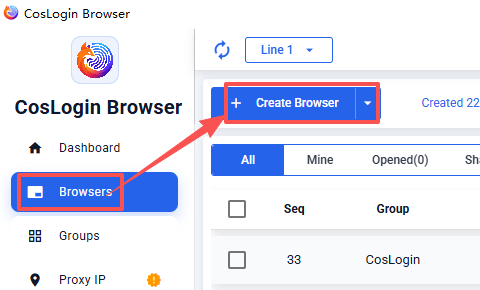
Help Center/Browser Management/Create Browser Create Browser Open the [CosLogin client] -> go to [Browser] in the left sidebar -> click [Create Browser].Configure the browser parameters as needed, or select [Random Fingerprint].Click [Confirm] to save. Related Articles Batch Create Browsers Open Selected Browsers Batch Edit Browsers Batch Close Browsers Batch Reopen Browsers Batch Export Cookies Share article Copy link NextBatch Create Browsers Last modified: 2026-08-05
 CosLogin Help Center