Geolocation
The website uses JavaScript to request the user’s permission to access geolocation data. A browser prompt will appear, allowing the user to decide whether to grant access.
Once permission is granted, the website can call the Geolocation API to retrieve location data. The API may collect information from multiple sources, including GPS, Wi-Fi, Bluetooth, and other positioning signals, to determine an accurate location.
Steps:
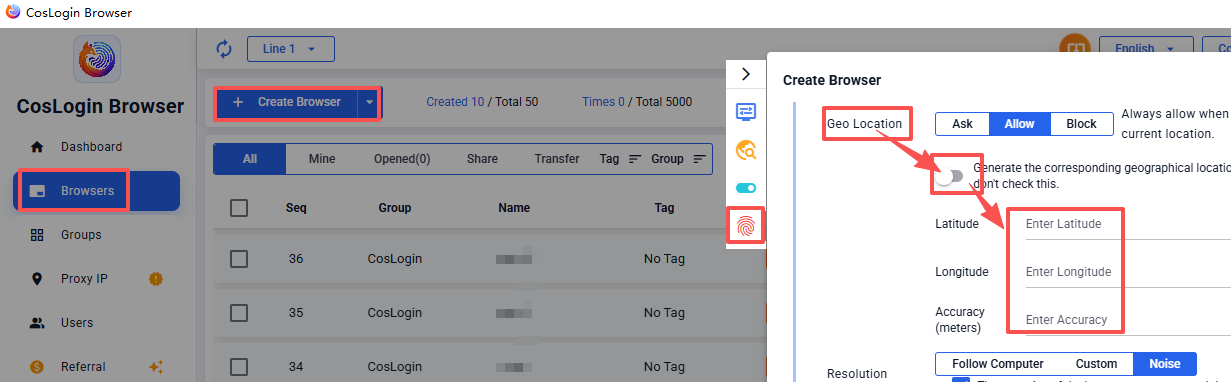
- Click the Create Browser button on the main client interface.
- In the profile configuration panel > Fingerprint > GeoLocation.
- Select "Ask": The website will show a prompt to ask for your current location. You can allow or deny it, similar to a regular browser prompt.
- Select "Allow": Always allow when a website requests your current location.
- Select "Block", Always deny when a website requests your current location.
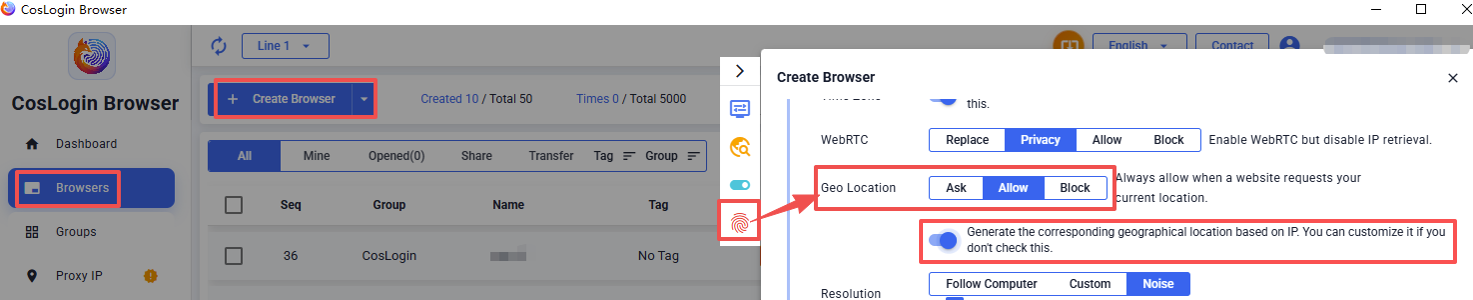
Note: When selecting "Ask" or "Allow", users can enable IP-Based Geolocation generation, or if not enabled, they can customize longitude, latitude, and accuracy (in meters).
IP-Based Geolocation
Manual Geolocation