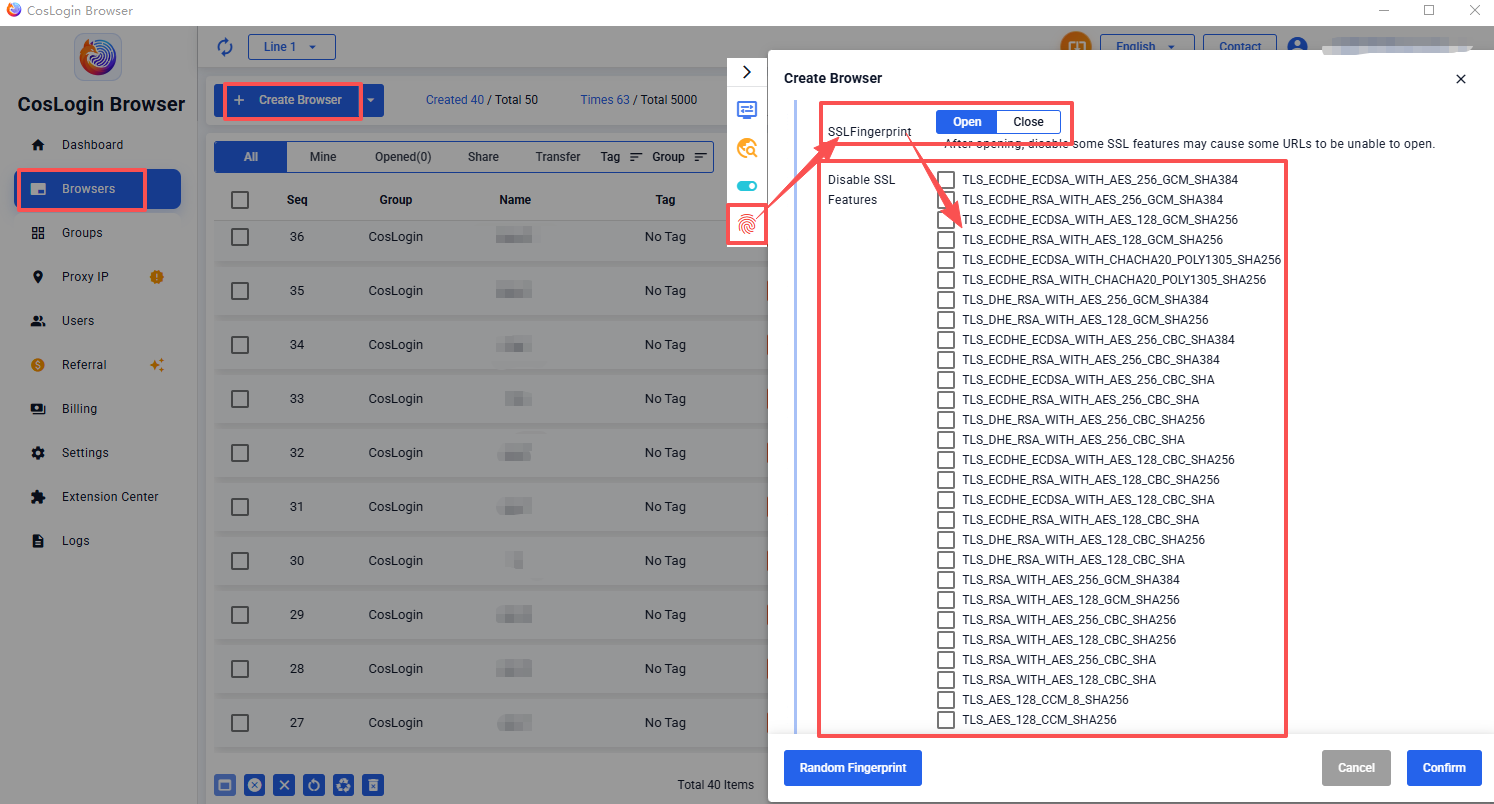
SSL Fingerprint
SSL Fingerprinting (also known as TLS fingerprinting) is a network fingerprint generated from TLS handshake characteristics that occur when a browser establishes a secure connection with a server. Websites can use these characteristics to identify and distinguish different browser environments.
JA3 is a common method for calculating TLS fingerprints. It generates a fingerprint based on multiple parameters collected during the TLS handshake process.
TLS (Transport Layer Security) is a widely used network security protocol and the successor to SSL (Secure Sockets Layer).
Steps:
- Click the Create Browser button on the main client interface.
- In the profile configuration panel > Fingerprint > SSL Fingerprinting.
- Open: Allows customization of disabled TLS features.
- Close: Uses the default TLS handshake behavior of the operating system and browser.
Note: Enabling SSL fingerprinting and disabling certain TLS features may affect compatibility with some websites and prevent them from loading properly.