User Agent (UA)
What is a User Agent (UA)
The User Agent (UA) is a part of the HTTP protocol, specifically a request header field. It provides an identifier that allows servers and peer networks to recognize the operating system and version, CPU type, browser and version, browser rendering engine, browser language, browser plugins, etc., used by the user. UAs generated by different operating systems will differ.
UA String Example and Field Description
Below is an example of a Firefox browser User Agent string:
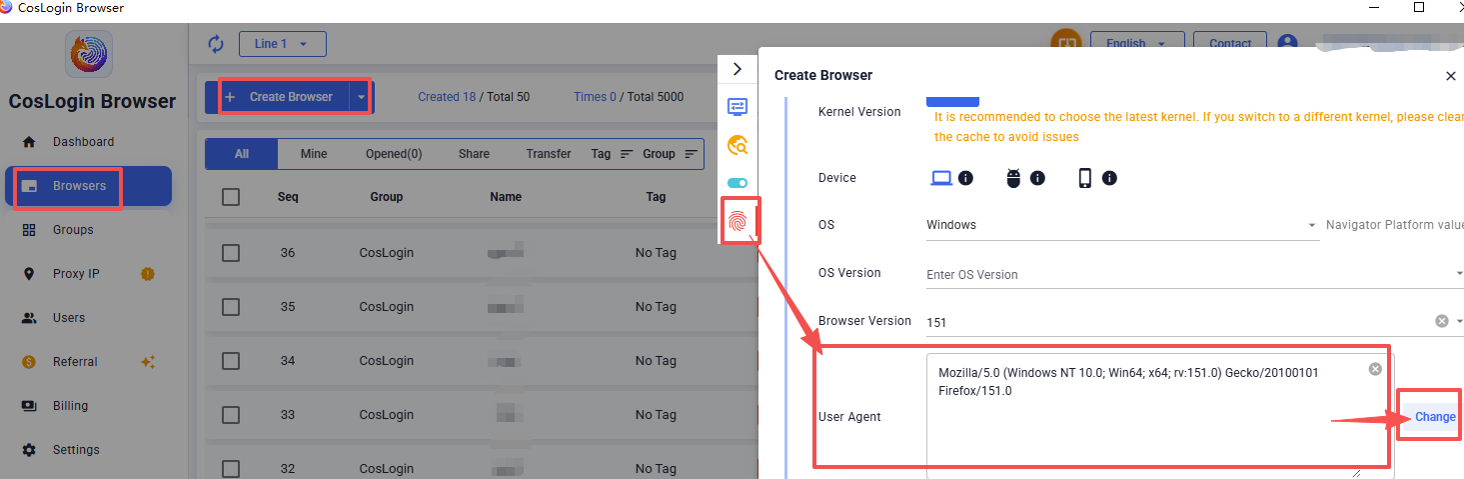
Mozilla/5.0 (Windows NT 10.0; Win64; x64; rv:151.0) Gecko/20100101 Firefox/151.0
Windows NT 10.0represents the Windows release version.rv:151.0represents the Firefox browser version.
Steps:
- Click the Create Browser button in the main interface of the client.
- In the profile configuration panel -> Fingerprint -> User Agent.
- Click the Change feature to randomly switch different UAs.