API Common Issues (Read First)
This article summarizes two common types of problems encountered when using the Local API: program exceptions caused by non-standard use of interface parameters, and incorrect parameter formatting in debugging tools. It emphasizes that JSON body parameters must be strictly passed according to the specifications, and Postman is recommended for debugging.
Non-standard interface parameter usage causes program errors or crashes
When using the Local API to create or modify windows, or perform other operations, ensure that the interface parameters fully comply with the specification. Do not arbitrarily delete or modify parameters, and do not pass values with unclear meaning or incorrect types.
Incorrect parameter format prompt when debugging with third-party tools
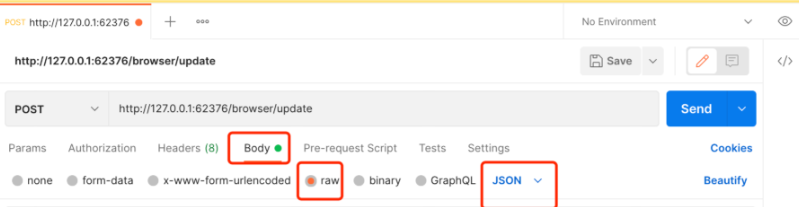
All Local API interfaces pass parameters in JSON format through the request body (body). Passing parameters via URL parameters, form-data, plain text strings, etc. is not accepted.
It is recommended to use Postman for interface debugging. After the interface is successfully connected, proceed with script development and calling.
Postman debugging example is as follows:

API Common Issues (Read First)
This document explains the most pitfalls encountered when integrating the CosLogin first-phase open API into a client.
1. Is the API a cloud API or a local API?
This document focuses primarily on cloud APIs; browser window opening/closing has been supplemented with Local API instructions.
Already supported:
- Browser window profile management
- Browser group management
- Browser window tag management
- Window proxy configuration saving
- Open browser via Local API
- Close browser via Local API
Not yet supported:
- Get PID
- Get debugging port
- Get real-time Cookie
- Arrange local windows
- RPA automation
Unsupported capabilities rely on client native processes, debugging ports, or automation environments, and are not yet covered in this document.
2. How should request parameters be passed?
All interfaces use JSON body.
Correct:
POST /browser/list
Content-Type: application/json
Authorization: Bearer {auth}
{
"page": 0,
"pageSize": 20
}
Do not use:
- Pass business parameters via URL query
- form-data
- x-www-form-urlencoded
- Plain string body
3. Where should the token be placed?
Recommended in Header:
Authorization: Bearer {auth}
Compatible method:
X-Cos-Auth: {auth}
Or:
{
"auth": "{auth}"
}
Clients should not concatenate auth into the URL, nor write it into ordinary logs.
4. What is the response format?
It is not exactly the same.
CosLogin first phase uniformly uses the existing response format:
{
"data": {},
"code": 0,
"msg": "success"
}
The client checks for success by seeing code === 0.
5. Why does page start from 0?
In the currently open interfaces, clients can pass:
{
"page": 0,
"pageSize": 20
}
page=0 indicates the first page. The backend will automatically convert to CosLogin internal page number.
6. How to handle 401?
Common responses:
{
"code": 401,
"msg": "auth required",
"data": {}
}
{
"code": 401,
"msg": "auth expired",
"data": {}
}
Client handling:
- Clear local login state
- Redirect to login
- Re-call
/api/member/login
7. How to handle 403?
Common responses:
{
"code": 403,
"msg": "permission denied",
"data": {}
}
Indicates the current user does not have the corresponding permission, or does not have permission to operate on that resource.
Client handling:
- Prompt no permission
- Refresh
/api/sysUsers/permissions - Do not automatically retry
8. What is the difference between a master account and a staff account?
Master account has all permissions within its master account space by default.
Staff account must meet both:
- Have functional permissions, such as
browser:list,browser:update:single - Have resource permissions, such as only being able to operate on windows, groups, and tags that they are authorized to access
Clients can call:
POST /api/sysUsers/permissions
To obtain current account permissions.
9. Is deleting a window a permanent deletion?
The first-phase compatibility interfaces /browser/delete and /browser/delete/ids move to recycle bin by default.
It is not a permanent deletion.
If permanent deletion is required later, use CosLogin existing recycle bin interface or extend a compatible interface separately.
10. How to pass no proxy settings?
Recommended:
{
"proxyMethod": 2,
"proxyType": "direct"
}
Compatible:
{
"proxyType": "noproxy"
}
Backend will normalize noproxy, no_proxy, none to direct.
11. Which interfaces should not be called via cloud API?
The following capabilities depend on local browser processes, debugging ports, or automation environments, and are not currently opened as cloud-compatible interfaces. /browser/open and /browser/close are already supported by Local API; please call them using the local request headers and local addresses described in Browser Window Interface.md.
| Capability | Cloud Interface Status | Description |
|---|---|---|
/browser/open | Not open | Local API supported, depends on local process launch |
/browser/close | Not open | Local API supported, depends on local process close and cache return |
/browser/pids | Not open | Depends on local process list |
/browser/ports | Not open | Depends on local DevTools port |
/browser/cookies | Not open | Depends on browser runtime state |
/windowbounds | Not open | Depends on local window management |
/rpa/* | Not open | Depends on local automation environment |