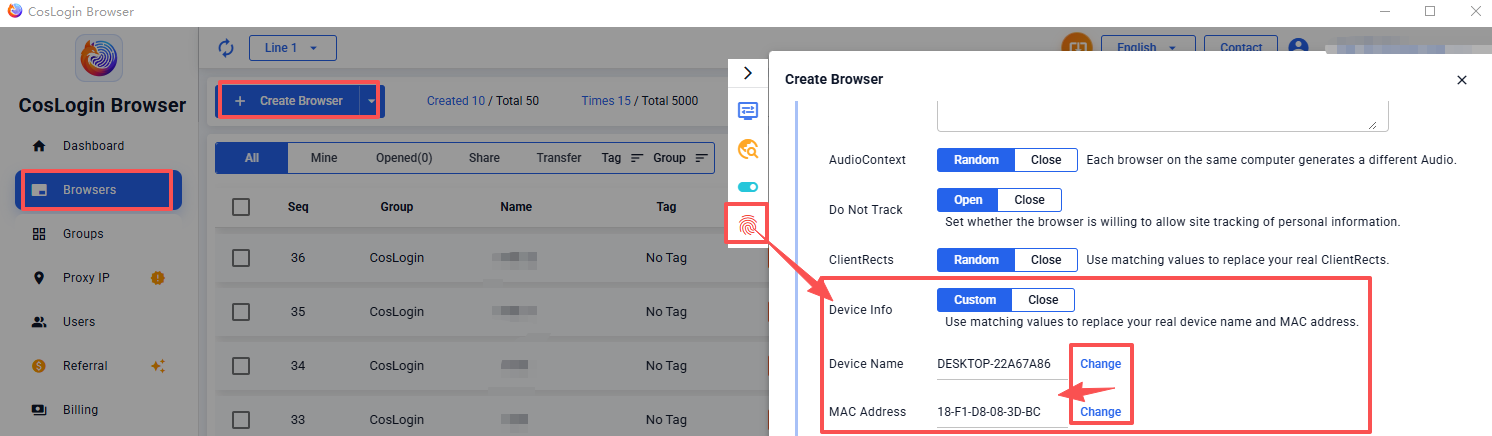
Device Name/Mac Address
Device Name
The device name is similar to a computer name and is used to distinguish between different browser environments, helping prevent duplicate names.
MAC Address
The MAC address (Media Access Control Address) is a network identifier used to distinguish devices within a local network.
Each MAC address consists of six pairs of hexadecimal characters, for example: 00:1B:44:11:3A:B7.
Note: In multi-account or multi-store scenarios, using the same MAC address across multiple accounts may cause these environments to be identified as linked.
Configuring Device Name and MAC Address:
- Click the Create Browser button on the main client interface.
- In the profile configuration panel > Fingerprint > Device Info > Custom/Close.
- Custom: Manually enter the device name and MAC address, or click Change to generate random values.
- Close: Each browser uses the default ClientRects of the current computer.